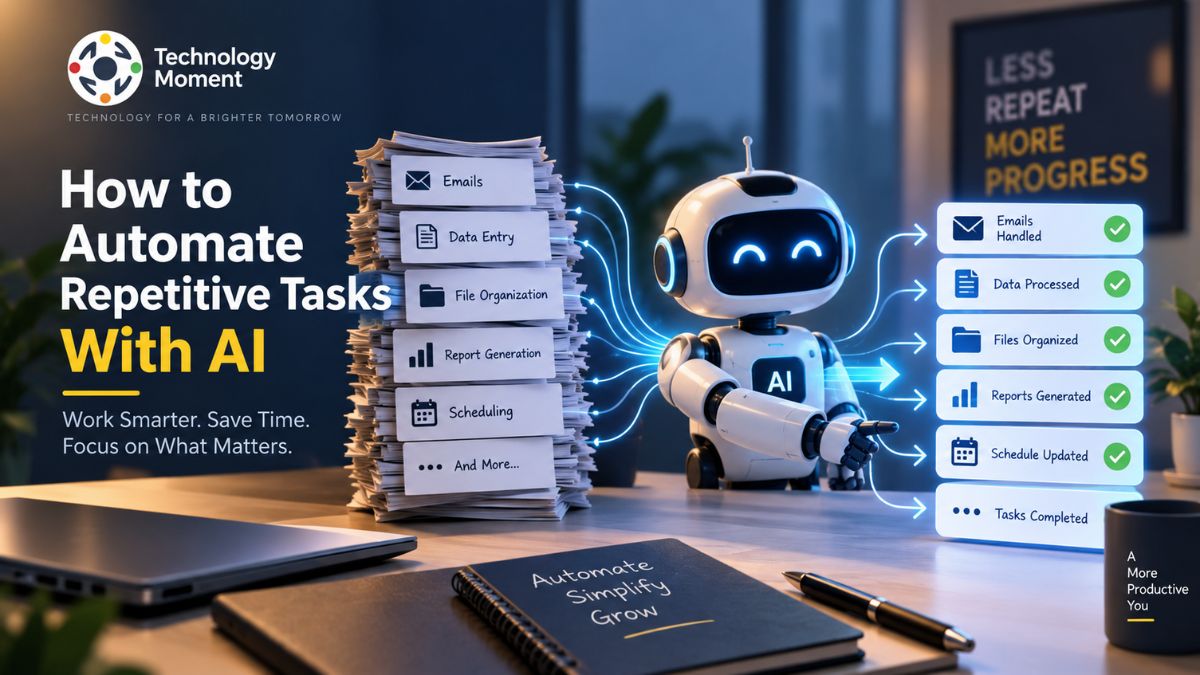
Sorting emails, moving information between apps, creating routine reports, organizing data, and completing the same steps again and again may seem manageable individually, but together they can take valuable time away from more meaningful work. Instead of simply helping you complete a task faster, modern AI tools can understand information, generate content, make decisions within defined rules, and work with automation platforms to move tasks from one step to the next.
The good news is that you do not need to be a developer to get started. With the right AI tools and workflow, many repetitive tasks can be automated with little or no coding. The key is knowing which tasks are suitable for automation, how to build a reliable workflow, and where human oversight is still necessary.
At Technology Moment, we focus on making complex technology easier to understand and apply in real-world situations. In this guide, you’ll learn how to automate repetitive tasks with AI, explore practical automation examples, understand the tools involved, and build workflows that can save time without sacrificing control or reliability.
What Is AI Task Automation?
AI task automation is the use of artificial intelligence to handle repetitive, time-consuming activities with less manual effort. Traditional automation generally follows predefined rules, such as moving information from one application to another when a specific event occurs. AI-powered automation adds the ability to understand text, classify information, generate content, summarize data, and respond to less structured inputs.
For example, a conventional workflow might automatically send an email whenever a form is submitted. An AI workflow can go further by reading the submitted information, identifying the customer’s request, creating a suitable response draft, and routing the request to the appropriate team. Common applications include email management, document processing, research, data organization, customer support, content workflows, and routine reporting. AI assistants can help with individual tasks, while automation platforms can connect multiple applications into a larger workflow.
AI automation does not necessarily mean removing humans from the process. In many situations, the most reliable approach combines automated processing with human review. Low-risk and predictable activities can run automatically, while sensitive decisions can require approval. Instead of following only a fixed sequence, an AI agent can work toward a defined objective, determine which tools or steps are required, and adapt to changing information within its permitted boundaries.
The goal of AI task automation is therefore not simply to automate everything. It is to reduce repetitive work while keeping people in control of important decisions. When designed properly, AI automation can become a practical productivity tool for everyday work and business processes.
What Repetitive Tasks Can AI Automate?
AI can automate many repetitive tasks when they involve digital information, predictable processes, or outputs that can be checked easily. The most suitable tasks are often those that require people to repeatedly read, organize, summarize, classify, transfer, or transform information. Email and communication are common starting points. AI can categorize incoming messages, summarize long conversations, identify action items, draft routine replies, and create follow-up reminders. Human review can remain part of the workflow before important messages are sent.
Data and document tasks are another useful area. AI tools can extract information from documents, summarize reports, organize files, classify records, and convert unstructured information into a consistent format. This can reduce repetitive manual data handling. Research and information management can also benefit from automation. A workflow might collect information from approved sources, summarize relevant material, organize findings, and produce a brief for later review. This can be particularly useful for professionals who regularly monitor developments in technology, business, or specific industries.
AI can also support content and marketing workflows. For example, a published article could trigger a workflow that creates a summary, prepares social media drafts, extracts key points, or adds information to a content management system. The generated material should still be reviewed before publication. For businesses, repetitive activities such as lead classification, customer inquiry routing, report preparation, appointment notifications, and internal updates can often be automated.
However, not every repetitive task should be fully automated. Activities involving financial decisions, sensitive personal information, legal consequences, security, or significant customer impact may require stronger controls and human approval. A useful rule is to begin with tasks that are frequent, measurable, low-risk, and easy to verify. This provides a practical foundation for expanding AI automation without sacrificing reliability.
How to Automate Repetitive Tasks With AI
The best way to automate repetitive tasks with AI is to start with a specific problem rather than choosing a tool first. A clear workflow makes it easier to determine what should happen automatically and where human involvement is needed.
1. Identify a repetitive task.
Look for activities that happen frequently and follow a recognizable pattern. Examples include sorting emails, summarizing documents, transferring information, preparing routine reports, or creating recurring notifications.
2. Define the desired result.
Describe what should happen when the workflow finishes. For example, an incoming customer email could be classified, summarized, and forwarded to the correct team with the relevant information included.
3. Choose an appropriate AI tool.
Depending on the task, you might use an AI assistant, automation platform, no-code workflow tool, or an AI agent. Simple workflows generally do not require complex systems.
4. Build the workflow.
A useful structure is:
Trigger → Input → AI Processing → Decision or Action → Output
The trigger starts the process, AI interprets or transforms the information, and the final action produces a useful result.
5. Connect your applications.
Workflow integrations can connect email, spreadsheets, project-management platforms, databases, communication tools, and other services. APIs may be required when a service does not provide a ready-made integration.
6. Test before enabling automation.
Use realistic examples, including unusual inputs. Check whether the AI produces accurate results and whether connected applications behave as expected.
7. Add safeguards.
Important workflows should include validation, permissions, error handling, and human approval where appropriate.
8. Monitor performance.
Automation is not a set-and-forget process. Review errors, unexpected outputs, failed integrations, and changing requirements regularly.
Starting with one small workflow is often more practical than attempting to automate an entire business process immediately. Once the workflow proves reliable, additional steps can be introduced gradually.
How AI Automation Workflows Work
An AI automation workflow connects several steps so that information can move from an initial trigger to a useful outcome with minimal manual intervention. The workflow may combine conventional automation rules with AI capabilities such as text analysis, classification, summarization, or content generation.
Consider a simple example involving incoming emails.
Trigger: A new email arrives.
Input: The workflow retrieves the email’s subject and message.
AI processing: An AI system analyzes the content and determines the category, summarizes the request, and identifies important action items.
Decision: Based on the classification, the workflow determines what should happen next.
Action: The message may be added to a task system, forwarded to a specific team, or included in a daily summary.
Output: The user receives an organized result instead of manually processing every message.
This trigger-based structure is the foundation of many AI workflows. More advanced automation can include multiple conditions, application integrations, approval steps, and error-handling processes. For example, a business workflow could receive a new lead, extract relevant information, use AI to classify the lead, add the information to a CRM, generate a follow-up draft, and notify a sales representative.
The important distinction is that AI does not replace the entire workflow. It usually performs specific reasoning or information-processing steps inside a broader automation system. Workflow integrations allow these steps to communicate across different applications. No-code automation platforms can make this possible without requiring extensive programming, while APIs and custom software provide greater flexibility for advanced requirements.
Reliable AI automation also needs boundaries. The workflow should define what data the AI can access, what actions it can perform, and when a human must intervene. This is particularly important when workflows handle sensitive information or make consequential decisions.
Best AI Tools for Automating Repetitive Tasks
The best AI tools for task automation depend on the type of work you want to automate. A general-purpose AI assistant may be enough for individual productivity, while businesses with multiple applications may need a dedicated automation platform.
AI assistants are useful for tasks such as summarizing information, drafting content, analyzing documents, generating ideas, and transforming text. They can be a good starting point when the user still wants to initiate or review each task manually.
Zapier focuses on connecting applications and building automated workflows. It can be useful when a process involves multiple services and follows a defined trigger-and-action structure. AI features can add capabilities such as text processing and information handling within those workflows.
Make provides visual workflow automation for users who want more detailed control over how information moves between applications. Its visual approach can be useful for workflows involving multiple steps, conditions, and integrations.
Microsoft Power Automate is designed for workflow automation across Microsoft’s ecosystem and other connected services. It can be particularly relevant for organizations already using Microsoft 365 and related business applications.
For more advanced requirements, AI agents can provide a different approach. Instead of executing only a fixed sequence, an agent can potentially determine which steps or tools are needed to complete a defined objective. However, agent-based automation can introduce additional complexity, so permissions, monitoring, testing, and human oversight become especially important.
When choosing automation tools, consider more than the number of AI features. Evaluate integrations, reliability, security, data handling, ease of maintenance, scalability, pricing, and the level of control available. For many users, the most practical path is to start with a simple workflow using an existing AI or no-code automation platform. As requirements become more complex, the workflow can evolve toward APIs, custom integrations, or agent-based systems.
How to Automate Tasks Without Coding
You do not need programming experience to start automating repetitive tasks with AI. No-code automation platforms allow users to connect applications, define triggers, add AI processing, and create useful workflows through visual interfaces. This makes AI task automation accessible to professionals, small businesses, and individuals who want to reduce manual work without building custom software.
The first step is to choose one repetitive task with a clear outcome. For example, you might want to summarize new documents, organize incoming emails, or send a notification whenever important information appears. Start with a workflow that is simple enough to test and measure. Next, identify the trigger. This is the event that starts the workflow, such as receiving an email, adding a spreadsheet row, submitting a form, or uploading a document. After the trigger, add the AI step that processes the information. Depending on the workflow, AI might classify text, extract information, summarize content, or generate a response.
The next step is the action. The result could be saved to a database, added to a project-management tool, sent to a team member, or used to create another task. Tools such as Zapier, Make, and Microsoft Power Automate can connect different applications without requiring traditional coding. However, no-code does not mean no planning. You still need to define instructions, test outputs, manage permissions, and create safeguards. For important workflows, keep a human approval step before an automated action is completed. This approach provides the convenience of automation while maintaining control over decisions that require judgment.
AI Automation Examples for Work and Business
AI automation can support many repetitive activities across modern workplaces. The most useful applications usually involve information that must be repeatedly collected, interpreted, organized, or transferred between systems. Email management is a common example. An automation can identify incoming messages, classify them by topic, summarize important information, and create follow-up tasks. Instead of manually processing every message, employees can focus on conversations that require their attention.
Customer support can also benefit from AI workflow automation. When a support request arrives, AI can identify the issue, extract relevant details, suggest a response, and route the ticket to the appropriate team. Human agents can review the recommendation before responding when accuracy is important. For small businesses, AI automation can help with lead management. A new form submission can trigger a workflow that extracts customer information, categorizes the lead, adds the record to a CRM, and notifies the appropriate salesperson.
Marketing teams can automate repetitive content workflows. For example, after publishing an article, an automation could generate a summary, prepare social media drafts, extract key points, and organize the content for later review. Research teams can use AI to monitor information from approved sources, summarize relevant developments, and prepare recurring reports. This can reduce the amount of manual information processing involved in ongoing research.
Routine business reporting is another practical use case. Data can be collected from connected systems, processed according to predefined rules, and presented in a consistent format. These examples show that AI automation is not limited to one industry. The underlying principle is the same: identify repetitive work, define the desired outcome, connect the necessary tools, and introduce AI where interpretation or content processing is required.
How to Automate Daily Tasks With AI
AI can also automate everyday tasks that repeatedly interrupt your schedule. The goal is not to automate every part of your day, but to reduce small administrative activities that consume attention and time. One practical example is a daily information workflow. At a scheduled time, an automation can collect information from selected sources, summarize relevant updates, and organize them into a brief. This can help users review important information without manually checking multiple sources.
Email organization is another useful application. AI can classify messages, identify urgent requests, summarize longer conversations, and highlight emails that require action. You can then review the results instead of sorting every message manually. For task management, AI can turn information into actionable items. For example, after a meeting summary is generated, relevant action items can be identified and added to a task-management system. This reduces the need to manually transfer notes into separate tools.
You can also automate daily reporting. Information from spreadsheets, project-management systems, or other applications can be collected and transformed into a structured update. A human can then review the report before sharing it. Another example is personal research. A workflow could collect updates about a specific topic, use AI to organize the information, and provide a concise summary for review.
When creating daily AI productivity workflows, keep the automation focused. Too many notifications or unnecessary automated actions can create additional noise rather than saving time. Start with one task that occurs every day and has a predictable result. Measure how much manual effort it removes, check the quality of the output, and expand gradually. This makes AI automation a practical productivity system rather than another complicated tool to manage.
AI Automation vs AI Agents: What’s the Difference?
AI automation and AI agents are related, but they generally describe different approaches to completing tasks. Traditional AI automation usually follows a defined workflow, while an AI agent can handle more dynamic tasks by determining which steps or tools may be required to reach a specified objective.
| Aspect | AI Automation | AI Agents |
|---|---|---|
| Workflow | Usually predefined | Can be more dynamic |
| Decision-making | Based on configured rules and AI steps | Can determine actions within defined goals and permissions |
| Process | Often follows a fixed sequence | May choose different steps depending on the situation |
| Predictability | Generally easier to predict | Can be less predictable |
| Setup | Usually simpler | Often requires more configuration |
| Human oversight | Useful for sensitive actions | Especially important for complex or consequential actions |
| Best suited for | Repetitive, structured workflows | Multi-step, changing tasks |
Benefits of Automating Repetitive Tasks With AI
The main benefit of AI task automation is reducing the amount of repetitive manual work people need to perform. When routine activities are handled consistently, employees can spend more time on tasks that require creativity, communication, analysis, or judgment. Automating activities such as data organization, email classification, document processing, and routine reporting can reduce the number of manual steps involved in everyday work.
AI automation can also improve consistency. A well-designed workflow can perform the same process repeatedly without employees having to remember every step. This is particularly useful when a business handles large numbers of similar requests. Another benefit is faster information processing. AI can summarize documents, classify information, extract relevant details, and transform unstructured content into more usable formats. This can make large volumes of information easier to review.
Automation can also support business scalability. As the number of customers, documents, requests, or transactions increases, automated workflows can handle certain repetitive processes without requiring every additional task to be completed manually. For individuals, AI productivity workflows can reduce administrative friction. Small automations—such as organizing information, creating reminders, or preparing summaries—can collectively free up useful time.
There are also potential benefits for business process automation. Teams can connect multiple applications and reduce unnecessary movement of information between systems. However, these benefits depend on implementation quality. Poorly designed automation can produce incorrect results, create unnecessary notifications, or introduce security and privacy risks. AI-generated outputs should therefore be validated, particularly when workflows affect customers, finances, sensitive data, or important business decisions.
Limitations and Risks of AI Task Automation
AI task automation can save time and reduce repetitive work, but it is not a substitute for careful process design. AI systems can misunderstand instructions, produce inaccurate information, or make inappropriate decisions when they receive incomplete or unexpected inputs. Understanding these limitations is essential before allowing an automated workflow to operate without human review.
One important risk is AI-generated errors. Unlike traditional rule-based automation, AI can interpret information probabilistically. A workflow that automatically summarizes documents or classifies customer requests may occasionally produce an incorrect result. Validation becomes particularly important when the output influences business decisions.
Data privacy and security are also important considerations. AI automation may process emails, documents, customer information, or internal business data. Before connecting a service, understand what information it receives, how access is controlled, and what permissions the workflow requires. Another concern is over-automation. Automating a poorly designed process does not necessarily improve it. It can simply make mistakes happen faster or introduce unnecessary complexity. Some tasks also require context, empathy, creativity, or professional judgment and should not be fully automated.
Integration failures can create additional problems. Connected applications may change their APIs, experience outages, or return unexpected data. AI agents introduce additional considerations because they can perform more dynamic, multi-step tasks. Their flexibility can make outcomes less predictable than a fixed workflow.
How to Choose Tasks for AI Automation
Choosing the right starting point can make the difference between a useful productivity workflow and a complicated system that creates more work than it removes. If an activity occurs several times a day or every week, even a small reduction in manual effort can produce meaningful time savings over time.
The task should also have a reasonably predictable process. Activities such as sorting information, creating summaries, moving data between applications, or generating routine notifications are often easier to automate than tasks requiring complex judgment. Consider whether the task is digitally accessible. AI workflow automation works best when the required information is already available through applications, files, databases, APIs, or other digital systems.
Another useful factor is verifiability. If you can easily check whether the automated result is correct, you can identify problems before they become serious. For example, automatically formatting information is generally easier to verify than automatically approving a sensitive financial transaction. You should also evaluate the risk of failure. Start with low-risk processes where an incorrect output can be corrected easily. Avoid giving an automation broad permissions until you understand how it behaves.
A simple evaluation framework is:
Frequency + Repetition + Digital Access + Clear Outcome + Easy Verification − Risk
The more a task satisfies the first five factors and the lower its potential impact from failure, the more suitable it may be for automation. For businesses, also consider maintenance costs, security requirements, integration complexity, and scalability. A workflow that saves ten minutes but takes hours to maintain may not provide meaningful value.
Frequently Asked Questions About AI Agents
What tasks can AI agents automate?
AI agents can potentially automate tasks involving research, information gathering, document processing, customer support, workflow coordination, and other multi-step activities. They are most useful when a process requires several decisions or interactions with tools. Important actions should remain subject to appropriate permissions, validation, and human oversight.
Can AI agents replace repetitive workflows?
AI agents can handle some repetitive workflows, but they do not automatically make traditional automation unnecessary. Fixed processes are often easier to manage with conventional workflow automation, while agents can be useful when the process changes based on information encountered during execution. The appropriate approach depends on the task’s complexity and risk.
Are AI agents safe for business automation?
Organizations should control permissions, protect sensitive information, validate outputs, monitor activity, and define when human approval is required. Higher-risk workflows require stronger controls because dynamic AI behavior can produce unexpected results.
How do AI agents use tools?
AI agents can be connected to tools such as search systems, databases, APIs, business applications, or automation platforms. Depending on their configuration, an agent can determine which available tool is relevant, provide the required information, process the result, and continue toward its objective. Permissions should restrict what actions the agent can perform.