Passwords have been part of our digital lives for years, but remembering multiple passwords, creating strong combinations, and protecting accounts from phishing attacks can be challenging. Even a strong password can become a security risk if it is reused across websites or exposed in a data breach. This is why passkeys are gaining attention as a simpler approach to online security.
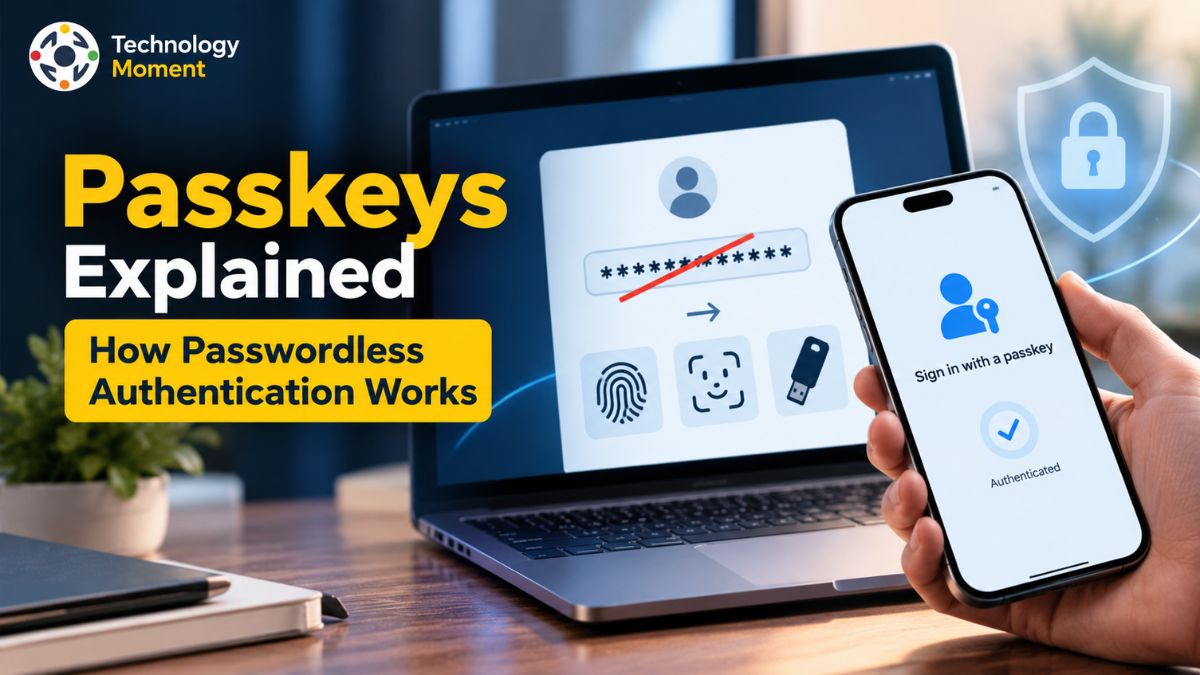
Passkeys explained means understanding how you can sign in to websites and apps without typing a traditional password. Instead, passkey authentication uses cryptographic keys linked to your account, while your device verifies your identity through a fingerprint, facial recognition, or screen lock PIN. This approach makes signing in more convenient while helping protect against common password theft and phishing attempts.
But how do passkeys actually work behind the scenes? What makes them different from passwords, and what happens if you lose your phone or switch to a new device? Understanding these details can help you decide whether passwordless authentication is right for your everyday accounts.
At Technology Moment, we make technology easier to understand by breaking down complex concepts into practical, straightforward explanations. In this guide, you will learn how passkeys use public and private cryptographic keys, why they offer stronger phishing resistance, how they work across compatible devices, and what account recovery options you should consider before relying on them.
Whether you are exploring modern authentication for the first time or looking for ways to improve your digital security, this guide will help you understand the benefits, limitations, and practical considerations of passkeys so you can make more informed decisions about protecting your online accounts.
What Are Passkeys Explained?
Passkeys are a modern passwordless authentication method that allows users to sign in to websites and apps without remembering or typing traditional passwords. Instead of relying on a secret combination of letters, numbers, and symbols, passkey authentication uses cryptographic credentials associated with a specific account. Users typically approve a sign-in request through their device’s screen lock, fingerprint authentication, facial recognition, or PIN. This makes logging in more convenient while helping improve account security.
To understand what passkeys are, it helps to compare them with passwords. A password is a secret that users enter into a website or app, where attackers may attempt to steal it through phishing, malware, or data breaches. Passkeys work differently because they use a public and private key pair. The private key remains protected by the user’s device or passkey provider, while the website stores the corresponding public key to verify authentication requests. The website does not need to store the private key to authenticate the user.
Another important feature of passkeys is their connection to the website or application for which they were created. This design helps prevent users from accidentally providing authentication credentials to fraudulent websites. Passkeys can also be synchronized across compatible devices through supported credential managers, although some are designed to remain on a particular device or security key.
Biometric authentication is not the passkey itself. A fingerprint or face scan simply helps verify that the authorized person can use the credential. Depending on the device, a PIN or another supported screen-lock method may also be available. Biometric information generally remains on the device rather than being sent to the website.
Passkeys are built on established authentication standards, including FIDO2 and WebAuthn. They are supported across many modern operating systems, browsers, and online services, although availability varies by platform. By combining cryptographic authentication with a familiar device-unlocking process, passkeys offer a practical alternative to traditional passwords and help users adopt stronger online security without adding unnecessary complexity.
How Do Passkeys Work?
Passkeys work through public key cryptography, a method that uses two mathematically related keys to verify identity without sharing the private credential with a website. When a user creates a passkey for an account, the authentication system generates a public and private key pair. The website or application stores the public key, while the private key remains protected within the device or credential-management system. This arrangement reduces the risk associated with storing reusable passwords on online services.
The process begins when a user registers a passkey with a compatible website or app. The service creates an account-specific registration request, and the device’s authenticator generates the cryptographic credentials. The public key is registered with the service, while the private key is retained by the appropriate authenticator or passkey provider. The user’s account is then associated with that credential.
During a later sign-in, the website requests proof that the user possesses the correct private key. It sends a unique cryptographic challenge to the authenticator. After the user approves the request using a fingerprint, face scan, device PIN, or another supported verification method, the authenticator uses the private key to sign the challenge. The website verifies the resulting digital signature with the stored public key. If the response is valid and the required checks succeed, authentication can be completed.
This process explains how passkeys authenticate users without transmitting a traditional password. The website receives cryptographic proof rather than a reusable secret that can simply be copied and entered elsewhere. Public key cryptography also means that exposing the public key alone does not give an attacker the private key needed to produce a valid authentication response.
Passkeys can be stored in a device’s built-in credential manager, managed by a supported third-party provider, or held on a compatible security key. Synced passkeys may be available across multiple devices, while device-bound passkeys remain associated with a particular authenticator. Cross-device authentication may also allow a user to approve a sign-in using a nearby phone.
These mechanisms rely on standards such as WebAuthn and FIDO2. Although the technical process happens largely in the background, the user experience is straightforward: select the passkey, verify your identity, and sign in.
Why Are Passkeys More Resistant to Phishing?
Phishing attacks attempt to trick people into revealing sensitive information, such as passwords, verification codes, or account credentials, through fake websites, deceptive emails, and fraudulent sign-in pages. Traditional password authentication is vulnerable because users can accidentally enter their passwords on convincing copies of legitimate websites. Attackers may then reuse those credentials to access the genuine accounts. Passkeys help address this problem through phishing-resistant authentication.
During authentication, the browser and operating system check the website’s identity and use the appropriate credential for that service. A fraudulent website pretending to be a legitimate service cannot ordinarily obtain a valid authentication response using a passkey registered for the genuine website. This website-binding mechanism reduces the risk of credential theft through fake login pages.
Passkeys also avoid the need to type a reusable password into a sign-in form. With password-based authentication, stolen credentials may be used in automated attacks against other websites, particularly when people reuse passwords. Even if a service’s database is compromised and its stored public keys are exposed, those public keys alone cannot be used to recreate the corresponding private keys or generate valid authentication signatures. Another advantage is that passkeys do not rely on users manually recognizing every suspicious login page. Traditional security codes sent through SMS or email can still be copied into a phishing website.
However, phishing resistance does not mean that every aspect of an account becomes invulnerable. Attackers may still target compromised devices, steal active sessions, exploit weaknesses in account recovery, or attempt to take over the account used to synchronize credentials. Users should therefore protect their devices, secure their passkey provider accounts, and review recovery settings.
Overall, passkeys provide a stronger foundation for passwordless security by reducing opportunities for phishing, credential reuse, and password theft. Their combination of cryptographic authentication and website identity verification makes them a valuable option for protecting online accounts.
Passkeys vs. Passwords: What Is the Difference?
Passkeys and passwords serve the same purpose: verifying your identity when you sign in to a website or application. However, the way they protect your account is significantly different. Traditional passwords rely on a secret combination of characters that users must remember, store, and enter correctly. Passkeys use cryptographic authentication, allowing users to verify their identity through a compatible device without typing a password.
With password-based authentication, users may create weak passwords, reuse credentials across multiple websites, or accidentally enter their details on fraudulent login pages. Even strong passwords can be exposed through phishing attacks, malware, or compromised services. Passkeys address several of these weaknesses by using a public and private key pair. The website stores the public key, while the private key remains protected by the user’s authenticator or passkey provider. This means a stolen public key cannot independently be used to sign in.
| Feature | Passkeys | Passwords |
|---|---|---|
| Authentication method | Cryptographic verification | Secret text entered by the user |
| Memory required | No password to remember | Must be remembered or stored |
| Phishing resistance | Designed to resist credential phishing | Can be stolen through fake login pages |
| Credential reuse | Separate credentials for supported services | Users may reuse the same password |
| Sign-in experience | Device verification, PIN, or biometrics | Enter username and password |
| Server-side storage | Public key | Password verifier or related credential data |
| Recovery | Depends on provider and account recovery options | Depends on password reset and recovery options |
Another important difference is usability. Passkeys can make sign-in faster because users can approve authentication using a fingerprint, facial recognition, or device PIN. They can also reduce the need for password resets and password-management tasks.
Are passkeys safer than passwords? For many common threats, particularly phishing and stolen-password reuse, passkeys provide meaningful security advantages. Nevertheless, they do not eliminate every risk, including compromised devices or weak account recovery procedures. Passwords may also remain available as a fallback on some services. Overall, passkeys offer a practical step toward passwordless authentication, combining convenience with stronger protection against several common account-security threats.
What Happens If You Lose Your Device With a Passkey?
Losing a phone, laptop, or other device that contains a passkey can be concerning, especially if you use it to access email, banking, or other important accounts. However, losing one device does not automatically mean losing access to every account protected by passkeys. The outcome depends on how your credentials are stored, whether they synchronize across devices, and which account recovery methods you have configured.
If you use synced passkeys, your credentials may be available through a compatible credential manager on another device after you regain access to the provider account. For example, supported passkeys can synchronize through services such as Apple iCloud Keychain or Google Password Manager. Availability depends on the provider, device compatibility, and the recovery process. Device-bound passkeys work differently. They remain associated with a specific device or authenticator rather than synchronizing through a credential manager. You might need to use another registered passkey, a compatible security key, or the website’s official account recovery process to regain access.
If your device is lost or stolen, start by securing the device and the accounts connected to it. Use the manufacturer’s remote-locking or device-management options where available. From another trusted device, sign in to important accounts and review their security settings. Account recovery methods are particularly important if you lose access to both your device and your passkey provider. Depending on the service, recovery may involve another trusted device, a backup authentication method, identity verification, or a designated recovery process.
To reduce future problems, consider registering another passkey on a separate trusted device or using a compatible backup security key where appropriate. Keep your recovery information current and secure your credential manager with strong account protection. Planning ahead helps ensure that a lost device becomes a manageable inconvenience rather than a prolonged account lockout.
Can You Use Passkeys Across Multiple Devices?
Yes, passkeys can work across multiple devices, although the exact process depends on the credential provider, operating system, browser, and website. This flexibility is one of the main advantages of passwordless authentication. Instead of remembering a separate password for every account, users can sign in through supported passkeys stored in a compatible credential manager or use another device to approve authentication.
One common option is a synced passkey. These credentials are managed by a supported provider and synchronized securely across compatible devices associated with the user’s account. For example, Apple users may access supported passkeys through iCloud Keychain, while Google users may use Google Password Manager. Other compatible credential managers can also support passkey synchronization.
However, synced passkeys should not be confused with device-bound passkeys. A device-bound passkey remains associated with its original authenticator and generally cannot be synchronized to other devices. In this situation, users may need to create separate passkeys on additional devices or keep a compatible backup authenticator. The best approach depends on the account’s security requirements and the available authentication options.
Cross-device authentication offers another possibility. For instance, you may be able to sign in to a website on your computer using a passkey stored on a nearby phone. The computer displays a QR code, which you scan with your phone, and you approve the request on that device. Supported systems use proximity checks and cryptographic protocols to help ensure the authentication request is being approved through the intended process.
Passkeys are supported across many modern platforms, including Android, iPhone, Windows, and Mac, but individual services may have different requirements. Before relying on cross-device sign-in, check whether your browser, operating system, and credential manager support the required functionality.
For everyday users, synced passkeys can provide a convenient balance between security and accessibility. If you prefer device-bound credentials, registering more than one passkey and maintaining a recovery option can reduce the risk of being locked out. Regardless of your setup, protect your provider account and use only trusted devices. With the right configuration, passkeys can make secure sign-in easier across your digital life.
Are Passkeys Completely Secure? Risks and Limitations
Passkeys are designed to make online authentication safer, but no security technology can eliminate every possible risk. They offer significant advantages over traditional passwords because they use public key cryptography, avoid sharing private credentials with websites, and provide strong protection against common phishing attacks. However, understanding passkey security risks and limitations is important before relying on passwordless authentication for every online account.
One major advantage of passkeys is that a website stores a public key rather than a reusable password. An attacker who obtains that public key from a compromised server cannot simply use it to sign in as the account owner. Passkeys are also associated with the website or application for which they were created, making it much harder for fraudulent login pages to capture credentials. These features help reduce phishing, password reuse, and credential-stuffing attacks.
Nevertheless, passkeys cannot protect users from every threat. If someone gains control of an unlocked device or successfully bypasses its authentication protections, they may attempt to access accounts available through that device. Malware, stolen active sessions, and weaknesses in an account’s recovery process can also create security problems. A compromised passkey-provider account may be particularly important when synced passkeys are involved because that account can help restore credentials to other devices.
Privacy is another consideration. Biometric information, such as fingerprints and facial recognition data, generally remains on the user’s device during passkey authentication rather than being transmitted to the website. However, users should still secure their devices, install software updates, and protect the accounts used to synchronize passkeys.
There are also practical limitations. Some websites do not support passkeys, and device-bound credentials may become unavailable if their authenticator is lost or damaged. Recovery options differ between services, so users should understand their available alternatives before removing passwords or other sign-in methods.
Overall, passkeys offer strong protection against several weaknesses of password-based authentication, but they are not completely risk-free. Using trusted credential managers, securing devices, reviewing recovery settings, and maintaining appropriate backup sign-in options can help users benefit from passkeys while reducing avoidable security problems.
Can Passkeys Replace Passwords and Two-Factor Authentication?
Passkeys are designed to replace passwords for account sign-in, and many supported websites and applications already offer this option. Instead of entering a password and potentially receiving a verification code, users can authenticate through a passkey stored on a compatible device or credential manager. This approach can improve convenience while reducing exposure to phishing, password reuse, and credential theft.
Traditional two-factor authentication adds another verification step to a password-based login. For example, a user may enter a password and then provide a one-time code sent by SMS or generated by an authenticator app. Although this can improve security, some methods remain vulnerable to phishing, and users must manage additional codes or devices. Passkeys offer a different approach by combining possession of a cryptographic credential with local user verification, such as a device PIN or biometric check, when required by the authentication flow.
This is why passkeys vs. two-factor authentication is not always a straightforward comparison. A properly implemented passkey with user verification can provide phishing-resistant authentication and may replace traditional password-plus-code workflows. In many consumer situations, it can offer stronger protection with fewer steps. However, whether a passkey satisfies a particular organization’s multifactor authentication policy depends on the implementation, assurance requirements, and applicable standards.
Passkeys also do not automatically replace every password everywhere. A website must support passkey authentication, and some services continue to provide passwords as a backup or alternative. Organizations may retain additional authentication requirements for sensitive systems, privileged accounts, or regulated activities. Account recovery methods must also be considered because weaker recovery procedures can undermine otherwise strong authentication.
Users should therefore check which sign-in methods a service supports before removing an existing password or second factor. Registering passkeys on supported devices and maintaining secure recovery options can make the transition easier. It is also sensible to protect the account used by a passkey manager, since access to that account may affect credential synchronization or recovery.
Ultimately, passkeys can replace passwords and, in appropriate implementations, some traditional two-factor authentication flows. They are not a universal replacement for every security control. Their main benefit is making phishing-resistant authentication simpler, helping people protect online accounts without depending on reusable passwords or easily intercepted verification codes.
Frequently Asked Questions About Passkeys
Are passkeys more secure than passwords?
Passkeys are generally more resistant to phishing and credential theft than traditional passwords. They use cryptographic keys rather than a reusable secret entered into a website, and authentication is linked to the legitimate service. This reduces risks from fake login pages and password reuse. However, compromised devices, stolen sessions, and weak account recovery methods can still threaten account security, so passkeys should be combined with sensible device and account protection.
Can passkeys be hacked?
Passkeys are designed to make common remote attacks, including phishing and credential stuffing, much harder. An attacker cannot normally recreate a private key from the public key stored by a website. However, compromised devices, exposed account sessions, or weaknesses in a passkey provider’s recovery process may create risks. Protect your devices, secure your credential manager, and review account activity regularly to reduce the likelihood of unauthorized access.
What happens if I lose my phone with a passkey?
Losing your phone does not necessarily mean losing access to your accounts. Synced passkeys may be restored through your supported credential manager on another device, while device-bound passkeys may require another registered credential or account recovery. If your phone is stolen, remotely lock it when possible, review your important accounts, remove compromised passkeys, and revoke unfamiliar sessions. Recovery options depend on the service and how your passkeys were stored.
Do passkeys require a fingerprint or facial recognition?
No. Passkeys do not require biometrics specifically. Depending on the device and authentication setup, you may approve sign-in using a fingerprint, facial recognition, a screen-lock PIN, or another supported method. The biometric check or PIN helps authorize use of the credential; it is not the passkey itself. This flexibility allows people without compatible biometric hardware to use passwordless authentication when their device and service support an alternative verification method.
Can passkeys replace passwords completely?
Passkeys can replace passwords on websites and apps that support passwordless authentication, but passwords have not disappeared from every service. Some platforms continue to offer passwords as alternative sign-in or account recovery methods. The transition depends on service support, user preferences, and security requirements. For stronger protection, enable passkeys where available, understand the recovery process, and avoid assuming that creating a passkey automatically disables every other sign-in method.
Can I use passkeys across multiple devices?
Yes, depending on the passkey provider and device compatibility. Device-bound passkeys, by contrast, remain associated with a particular authenticator. Some services also support cross-device sign-in using a nearby phone. Check your platform’s synchronization settings and recovery options before relying on a single device for account access.
Where are passkeys stored?
Passkeys are stored and managed by a compatible authenticator or credential provider. Depending on your setup, they may be held by a device’s built-in credential manager, a supported third-party password manager, or a hardware security key. Synced passkeys can be securely synchronized between compatible devices, while device-bound credentials remain tied to a specific authenticator. The exact storage and recovery behavior depends on the provider, operating system, and authentication method.