
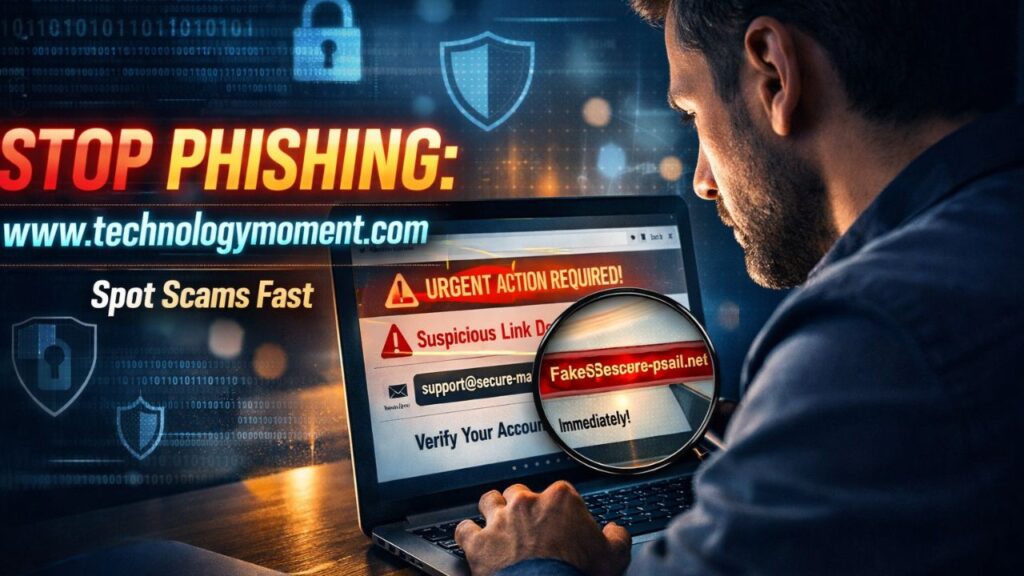
Cyber threats no longer arrive with obvious warning signs—they blend into daily digital life, hiding inside emails, messages, and even trusted-looking websites. One careless click can expose personal data, compromise accounts, and trigger consequences that go far beyond a simple mistake.
At Technology Moment, we’ve seen how a single phishing attempt can disrupt individuals and businesses alike. These attacks are no longer limited to poorly written spam emails; they are carefully crafted to look legitimate and urgent. From banking alerts to job offers, attackers are constantly refining their tactics to exploit human behavior, making it harder than ever to separate real communication from malicious intent.
Today’s scams go beyond the typical phishing attempt email. A potential phishing attempt can appear as a text message, a social media notification, or even a highly personalized message known as a spear phishing attempt—a tactic where attackers target specific individuals with tailored information. In one common scenario, users receive a fake security alert that pressures them to act quickly, because phishing attempts try to get you to act with urgency and fear rather than logic.
This guide breaks down exactly how these attacks work and, more importantly, how to recognize and avoid them in real time. You’ll learn practical, proven strategies to stay protected in an increasingly deceptive digital environment. By the end, you’ll be equipped to confidently identify any phishing attempt before it has the chance to do damage.
The Rise of Digital Fraud in Everyday Life
Phishing attacks have evolved rapidly in recent years, becoming more sophisticated and harder to detect than ever before. What used to be poorly written scam emails has now transformed into highly convincing messages that mimic trusted brands, banks, and even colleagues. A modern phishing attempt often looks so real that even experienced users can struggle to identify it at first glance. With more people relying on digital platforms for work, banking, and communication, attackers now have a larger and more vulnerable target audience.
One major reason these attacks are more dangerous is the use of personalization. Cybercriminals no longer send generic messages; instead, they craft emails that include your name, job role, or recent activity. This is known as a spear phishing attempt, where the attacker targets a specific individual or organization. Because these messages feel relevant and urgent, people are more likely to trust them and respond quickly without verifying their authenticity.
Another factor increasing the risk is the variety of channels used. A phishing attempt is made via email, SMS, social media, and even phone calls. For example, a phishing attempt done via text messaging is called “smishing,” and it often tricks users into clicking on malicious links on their phones. As technology grows, so do the methods attackers use to exploit it.
The consequences of falling for a phishing attack are serious. From stolen passwords to financial fraud and identity theft, the damage can be long-lasting. According to recent reports, phishing remains one of the most common cybersecurity threats worldwide. This makes awareness and prevention more important than ever.
What Is a Phishing Attempt?
A phishing attempt is a form of cyberattack where someone tries to trick you into sharing sensitive information such as passwords, credit card details, or personal data. In simple terms, phishing is an attempt to acquire sensitive information by pretending to be a trustworthy source. This could be an email from a “bank,” a message from a “service provider,” or even a fake notification from a popular app.
The process usually starts with a message designed to grab your attention. It may create urgency, such as warning you about a suspicious login or asking you to verify your account immediately. A phishing attempt email often includes a link that directs you to a fake website that looks almost identical to the real one. Once you enter your details, attackers capture and misuse that information.
What makes phishing effective is the psychological manipulation behind it. Attackers rely on emotions like fear, curiosity, or excitement. For instance, a common phishing attempt might promise a reward or threaten account suspension. These tactics push users to act quickly without thinking critically, increasing the chances of success.
Understanding how phishing works is the first step toward protection. When you recognize that phishing is an attempt to obtain sensitive data through deception, you become more cautious in your online interactions. This awareness helps you pause, verify, and avoid falling into the trap of even the most convincing scams.
Types of Phishing Attacks You Must Know
Phishing attacks come in many forms, and understanding these variations can help you stay one step ahead. The most common type is the email phishing attempt, where attackers send fake emails that appear to come from trusted organizations. These emails often include links or attachments designed to steal information or install harmful software on your device.
Another growing form is SMS phishing, also known as smishing. In this case, a phishing attempt is made via text message, usually containing a link or urgent message. For example, you might receive a text claiming your bank account is blocked and asking you to click a link to fix it. Because people tend to trust messages on their phones more, this method can be surprisingly effective.
A more advanced version is the spear phishing attempt, which targets specific individuals or businesses. Spear phishing is a highly targeted phishing attempt that uses personal information to appear legitimate. For instance, an attacker might pretend to be your manager and request sensitive data. This level of customization makes it harder to detect compared to general phishing scams.
There are also phishing attacks on social media and fake websites. Attackers create duplicate profiles or pages to trick users into sharing login credentials. In many cases, these attacks look completely real, making them a dangerous form of phishing attempt. By knowing these types, you can better recognize threats and respond more carefully in different situations.
7 Proven Ways to Spot a Phishing Attempt
1) Suspicious Sender Email Address or Number
One of the earliest warning signs of a phishing attempt is a suspicious sender. At first glance, the name may look familiar, but the actual email address or phone number often reveals the truth. Attackers commonly use slight variations, such as replacing letters with numbers or adding extra characters, to mimic trusted organizations. For example, an email that appears to come from your bank might actually come from a completely unrelated domain.
It’s important to look beyond the display name and carefully check the full email address. A legitimate company will always use its official domain, while a phishing attempt email may use free services or strange combinations. The same applies to SMS messages, where unknown or international numbers can signal a potential scam.
2) Urgent or Threatening Language
Phishing messages often create a sense of urgency to push you into quick action. You might see subject lines like “Your account will be suspended today” or “Immediate action required.” This tactic is designed to make you panic and respond without verifying the message.
A phishing attempt tries to get you to act with fear or pressure, reducing your ability to think logically. Legitimate companies rarely use threatening language or demand instant action without proper notice. If a message feels overly urgent, it’s a strong signal to pause and double-check its authenticity.
3) Fake Links and Mismatched URLs
Links are one of the most common tools used in phishing attacks. While the visible text may look legitimate, the actual URL can lead to a malicious website. This is a classic method used in an email phishing attempt to trick users into entering sensitive information.
Before clicking any link, hover over it to see the real destination. If the URL looks suspicious, contains random characters, or doesn’t match the official website, it’s likely a phishing attempt. Even small differences, like “.net” instead of “.com,” can indicate a fake site designed to steal your data.
4) Requests for Sensitive Information
A genuine organization will never ask for confidential details like passwords, OTPs, or credit card numbers via email or text. If you receive such a request, it is almost certainly a phishing attempt. These messages often pretend to be from banks, government agencies, or popular services to gain your trust.
Phishing is an attempt to acquire sensitive information by deceiving users, and direct requests for personal data are a major red flag. Always verify the request through official channels before sharing any information.
5) Poor Grammar or Unusual Formatting
Many phishing messages contain spelling mistakes, awkward sentences, or inconsistent formatting. While some advanced attacks are well-written, a common phishing attempt still often includes noticeable language errors.
These mistakes happen because attackers may not be fluent in the language or rely on automated tools. Pay attention to unusual greetings, inconsistent fonts, or poorly structured content. These small details can help you identify a phishing attempt before it causes harm.
6) Unexpected Attachments or Downloads
Attachments can carry hidden malware that infects your device once opened. If you receive an unexpected file, especially from an unknown sender, treat it with caution. A phishing attempt is made via attachments that may look like invoices, resumes, or official documents.
Even if the sender appears familiar, verify before opening anything. Cybercriminals often disguise harmful files with common formats like PDFs or Word documents. When in doubt, avoid downloading or opening the attachment altogether.
7) Too-Good-To-Be-True Offers
If a message promises something that feels unreal, such as winning a lottery you never entered or receiving a huge reward, it’s likely a phishing attempt. These scams rely on excitement and curiosity to lower your guard.
A common phishing attempt uses attractive offers to lure users into clicking links or sharing personal details. Always question deals that seem overly generous or unrealistic. If it sounds too good to be true, it probably is.
Real-Life Examples of Phishing Attempts
A phishing attempt often looks harmless at first glance, which is exactly why so many people fall for it. One of the most common phishing attempt scenarios involves a fake bank email. You might receive a message claiming there is suspicious activity on your account, urging you to click a link immediately. The design looks professional, the logo appears real, and the tone creates urgency. But in reality, it is an email phishing attempt designed to redirect you to a fake login page where your credentials are captured.
Another typical example is a job offer or lottery scam. You receive an email or message congratulating you on winning a prize or getting selected for a high-paying job. The catch is that you need to provide personal details or pay a small “processing fee.” This type of phishing is an attempt to acquire sensitive information or money by exploiting excitement and curiosity. Many people overlook the warning signs because the reward seems too good to ignore.
Social media has also become a hotspot for phishing attacks. A common phishing attempt happens when someone sends a message pretending to be from a platform like Instagram or Facebook, asking you to verify your account. These messages often include links that look legitimate but lead to fake pages. Once you enter your login details, attackers gain access to your account.
These real-life cases highlight an important pattern: every phishing attempt tries to get you to act quickly without thinking. Recognizing these patterns is the first step toward staying safe online.
How to Protect Yourself from Phishing Attacks
Protecting yourself from a phishing attempt starts with awareness and small daily habits. The most effective defense is to pause before taking action. Many phishing messages are designed to create urgency, making you feel like you must respond immediately. Instead, take a moment to verify the source. Whether it is a phishing attempt email or a suspicious message, always double-check the sender’s identity before clicking anything.
Another important step is to strengthen your digital security. Using strong, unique passwords for each account significantly reduces risk. Enabling two-factor authentication adds an extra layer of protection, even if your credentials are compromised. Since phishing is an attempt to obtain sensitive information, these added security layers make it much harder for attackers to succeed.
Technology also plays a key role in prevention. Keep your devices updated and use reliable antivirus or security software. Modern tools can detect a potential phishing attempt and warn you before any damage is done. Browser security features and spam filters also help block many threats automatically, but they are not foolproof, so user awareness remains essential.
Finally, avoid using public Wi-Fi for sensitive activities like banking or logging into important accounts. Attackers often exploit unsecured networks to intercept data. By combining awareness, strong security practices, and cautious behavior, you can greatly reduce your chances of becoming a victim of phishing attacks.
What to Do If You Fall for a Phishing Attempt
Falling for a phishing attempt can feel stressful, but quick action can limit the damage. The first thing you should do is disconnect from the internet if you suspect you clicked a malicious link or downloaded something harmful. This helps prevent further data from being transmitted to attackers. Acting fast is crucial because even a few minutes can make a difference in protecting your information.
Next, secure your accounts immediately. Change your passwords for the affected account and any other accounts that share the same credentials. If the phishing attempt involved banking or financial details, contact your bank right away to block unauthorized transactions. Since phishing is an attempt to acquire sensitive information, updating your credentials quickly can stop attackers from gaining full access.
It is also important to scan your device using trusted security software. This helps detect any malware that may have been installed during the phishing attempt. If needed, consider resetting your device or seeking professional help to ensure it is completely secure. Ignoring this step can leave your system vulnerable to future attacks.
Finally, report the incident to the relevant platform or authority. Reporting a phishing attempt email or message helps organizations track and prevent similar attacks. While it may feel like a mistake, taking responsible action not only protects you but also helps others avoid becoming victims.
Phishing Prevention Tips for Businesses & Teams
Businesses face a higher risk when it comes to phishing because attackers often target employees to gain access to sensitive company data. A single phishing attempt can lead to major financial loss or data breaches. That is why organizations must focus on building awareness among their teams. Regular training sessions help employees understand how a common phishing attempt works and how to identify warning signs before it is too late.
Creating a strong internal security culture is equally important. Employees should feel comfortable reporting a potential phishing attempt without fear of blame. Encouraging open communication ensures that threats are identified early and handled quickly. Since phishing is an attempt to obtain sensitive business information, even one alert employee can prevent a large-scale incident.
Technology also plays a vital role in protecting businesses. Advanced email filtering systems can detect suspicious messages and block them before they reach employees. Tools that identify spear phishing attempts are especially useful, as spear phishing is a highly targeted phishing attempt aimed at specific individuals within an organization. These attacks are more sophisticated and harder to detect, making security tools essential.
Finally, businesses should establish clear cybersecurity policies. This includes guidelines on handling emails, sharing data, and responding to suspicious activity. When combined with training and technology, these policies create a strong defense system that reduces the risk of phishing attacks and keeps both data and employees safe.
Conclusion
Staying safe online is no longer optional—it is a daily necessity. A phishing attempt can appear in many forms, from emails and text messages to fake websites and social media links. What makes these attacks dangerous is how normal and convincing they look. They are carefully designed to trick you into trusting them, often by creating urgency or fear. Understanding that phishing is an attempt to acquire sensitive information is the first step toward protecting yourself.
The most important takeaway is awareness. Once you know how a phishing attempt works, you start noticing the small warning signs that others might miss. Whether it’s a suspicious sender, a strange link, or a request for personal details, these signals are often enough to stop an attack before it succeeds. Even a common phishing attempt follows patterns, and recognizing those patterns gives you a strong advantage.
At the same time, good digital habits play a huge role in your safety. Simple actions like verifying links, avoiding unknown downloads, and enabling two-factor authentication can make a big difference. Cybersecurity is not about being perfect; it’s about being cautious and consistent. Even if you face a potential phishing attempt, your response determines the outcome.
In the end, the internet will always have risks, but you don’t have to be an easy target. Stay alert, think before you click, and keep learning about new threats. Your awareness is your strongest defense, and with the right mindset, you can stay one step ahead of attackers.
Frequently Asked Questions
What is a phishing attempt in simple words?
A phishing attempt is a type of online scam where someone tries to trick you into sharing personal or sensitive information. This could include passwords, bank details, or login credentials. Usually, the attacker pretends to be a trusted source, like a bank, company, or even a friend. The goal is to make you act quickly without thinking.
How can I tell if an email is a phishing attempt?
A phishing attempt email often contains warning signs such as strange sender addresses, urgent language, or suspicious links. If the message asks for personal information or pressures you to act immediately, it is likely fake. Always double-check the source before clicking on anything.
What is a phishing attempt done via text messaging called?
A phishing attempt done through text messages is called “smishing.” In this type of attack, scammers send SMS messages with fake links or urgent requests. These messages may look like they come from banks, delivery services, or government agencies.
What should I do after clicking a phishing link?
If you accidentally click on a phishing link, act quickly. Change your passwords immediately, especially for important accounts like email and banking. Run a security scan on your device and monitor your accounts for any unusual activity.
Can phishing attacks steal my bank details?
Yes, phishing is an attempt to obtain sensitive information, including bank details. If you enter your financial information on a fake website, attackers can use it to steal money or commit fraud. That’s why it’s important to verify websites before entering any details.
What is spear phishing, and how is it different?
A spear phishing attempt is a highly targeted attack aimed at a specific person or organization. Unlike general scams, it uses personal information to appear more believable. This makes it more dangerous and harder to detect.
Are phishing attacks illegal and punishable?
Yes, phishing attacks are illegal in most countries. They fall under cybercrime laws and can lead to serious penalties, including fines and imprisonment. Governments and organizations actively work to track and stop these activities.









Great article! One of the most common indicators of a phishing attempt is the presence of urgent or threatening language in the email, like “Immediate action required” or “Your account will be locked.” Phishers often create a sense of urgency to trick users into clicking on malicious links or providing sensitive information. Another red flag is checking the sender’s email address — even if it looks legitimate at first glance, it may contain small spelling errors or strange domain names. Always stay cautious and verify through official channels before clicking on any suspicious links. Thanks for sharing these helpful tips!
Great insights! One of the most common indicators of a phishing attempt is the use of unexpected or suspicious links within an email. These links often appear legitimate at first glance but may lead to fraudulent websites designed to steal personal information. Always hover over links to check the actual URL before clicking. Also, be wary of unsolicited emails that request personal or financial details — legitimate companies will never ask for sensitive information this way. Thanks for shedding light on this important topic!
Thanks for the informative article! A common indicator of phishing attempts is the presence of poorly crafted emails, with spelling errors or unusual phrasing. Cybercriminals often don’t take the time to write polished content, so looking out for these subtle mistakes can help you spot a scam. Another key warning sign is unfamiliar or suspicious sender addresses—if something doesn’t look right, it’s always better to err on the side of caution. Great tips, keep up the good work!
Excellent article! A common indicator of phishing attempts is receiving unsolicited emails that ask for sensitive information, like login credentials or credit card details. Phishers often try to create a sense of urgency, like claiming your account is compromised and asking you to act immediately. Always double-check the sender’s email address and look for any signs that the message may not be legitimate. Thanks for raising awareness about these important cybersecurity threats!